Maya to Keyframe Pro 2 Overview
The Maya to Keyframe Pro 2 script is an addon for Autodesk Maya that allows Maya to communicate with Keyframe Pro 2.
This script opens a small UI in Maya and includes features to sync with Maya’s timeline, create playblasts, modify the Keyframe Pro 2 viewer layout and update other settings.
See the Installation Guide for detailed setup instructions.


User Interface
The Maya to Keyframe Pro 2 UI is a window that displays in Maya. It is divided into four sections: Sync, TC Frame Offset, Viewer and Playblast: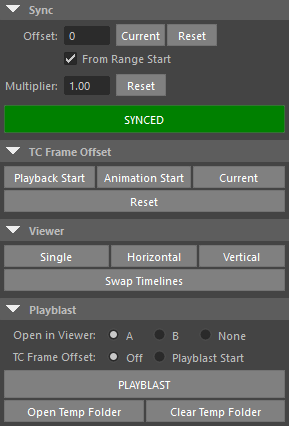
Sync
When synced, Maya's playback time drives Keyframe Pro 2. The current frame in Keyframe Pro 2 updates any time the current frame in Maya changes.
Sync is enabled by clicking the Sync button. This button turns green when sync is enabled.
-
Offset
-
From Range Start
-
Multiplier
TC Frame Offset
The TC Frame Offset section contains buttons used to set the TC Frame Offset Override value (for the current source/timeline) in Keyframe Pro 2.
The TC Frame Offset Override changes the start frame displayed by the Keyframe Pro 2 time control.
This is very useful when creating playblasts that don't start on frame 1, allowing Keyframe Pro 2's displayed frame to match the current Maya frame.
Viewer
The top row buttons (Single, Horizontal and Vertical) change the viewer layout in Keyframe Pro 2
The Swap Timelines button, switches the timelines in the A and B viewers with one another.
Playblast
Clicking the Playblast button creates a plastblast using Maya's current settings and opens it in Keyframe Pro 2.
-
Open in Viewer
-
TC Frame Offset
-
The Open Temp Folder button opens Keyframe Pro 2's temporary directory (used for playblasting).
The Clear Temp Folder button removes all items from this directory.